

Download Appoint ly – free one‑click scheduling tool for businesses
Overview
Appoint ly is a cloud‑based scheduling application designed to eliminate the endless email chain and double‑booking nightmares that plague small‑to‑medium businesses. By embedding a simple, one‑click booking widget on a website, service providers let customers choose from real‑time available slots, automatically syncing the appointment to Google Calendar, Outlook, Apple Calendar, or any major digital calendar. The platform also sends automated reminder emails and SMS notifications, ensuring that clients show up on time even if they missed the calendar sync. Because the service runs entirely in the browser, there is no need for heavyweight installations or costly licenses – the core features are free, with premium add‑ons available for businesses that need advanced reporting or custom branding. In short, Appoint ly turns a tedious back‑and‑forth process into a streamlined, self‑service experience that saves time, reduces no‑shows, and improves overall customer satisfaction.
Key Features
- One‑click booking widget – Embed a responsive calendar on any website or landing page with just a few lines of code.
- Real‑time availability – Syncs instantly with Google Calendar, Outlook, iCal, and other major calendars to prevent double bookings.
- Automated reminders – Email and SMS reminders are sent 24 hours and 1 hour before the appointment.
- Multiple time‑zone support – Perfect for businesses with international clients; the widget automatically adjusts to the visitor’s local time.
- Customizable booking forms – Collect additional information such as service type, notes, or payment details.
- Analytics dashboard – Track booking trends, peak hours, and no‑show rates to optimize staffing.
- Integrations – Connect with Zapier, Stripe, PayPal, and popular CRM tools for a seamless workflow.
- Secure data handling – All data is encrypted in transit (TLS 1.2) and stored on GDPR‑compliant servers.
- Free tier – Unlimited bookings for a single staff member, making it ideal for solo entrepreneurs.
- Mobile‑friendly – Fully responsive design ensures a smooth booking experience on Android, iOS, and desktop browsers.
Installation & Usage Instructions
Step‑by‑step setup
Getting started with Appoint ly is intentionally straightforward. First, visit the official website and click the “Sign Up for Free” button. After entering a valid email address and creating a password, you’ll be taken to the dashboard where you can add your business details, define service categories, and set your working hours. The platform guides you through a wizard that creates a personalized booking link and generates the embed code for the widget.
To place the widget on a website, copy the provided JavaScript snippet and paste it into the HTML of the desired page – typically just before the closing tag. For popular website builders such as WordPress, Wix, or Squarespace, Appoint ly offers a dedicated plugin or a simple HTML block, removing any need for coding expertise.
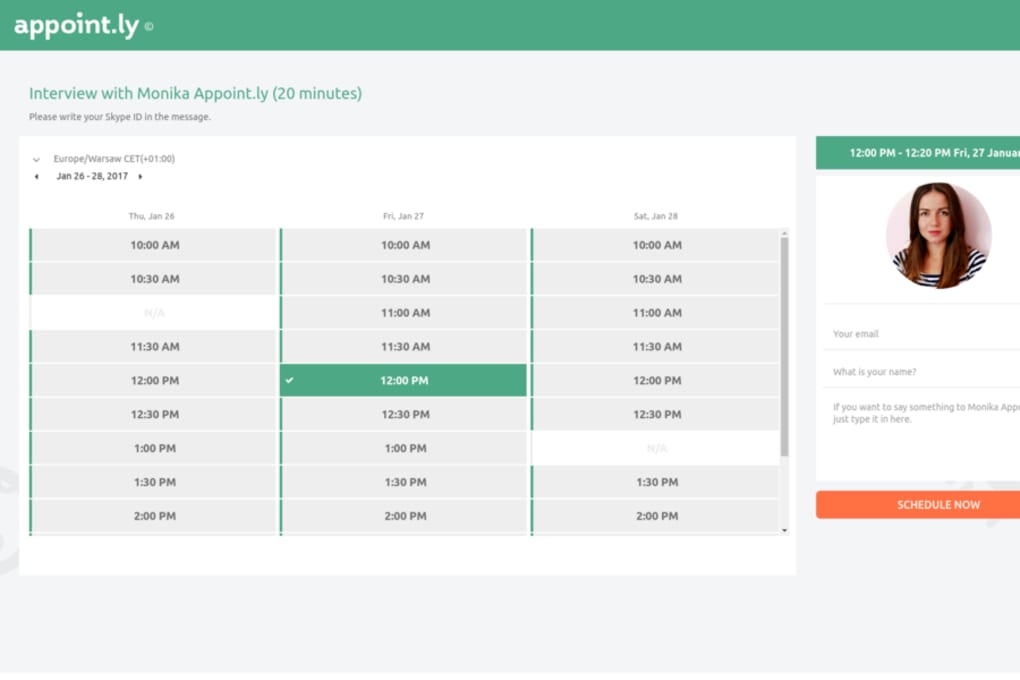
Once the widget is live, clients can click on available slots, fill in any required fields, and confirm the appointment. The system immediately creates a calendar event in the business’s linked calendar and sends a confirmation email to the client. If the client opts in for SMS notifications, a short message with the appointment details is also dispatched.
From the business side, you can manage bookings through the web dashboard or the native mobile app. The dashboard provides a calendar view, a list of upcoming appointments, and quick actions such as rescheduling, cancelling, or adding notes. All changes are synchronized across devices in real time, ensuring that staff always see the latest schedule.
Because Appoint ly is cloud‑based, there are no software updates to download – the service is continuously improved on the server side. When new features roll out, they become instantly available to all users without any manual intervention.
Compatibility, Pros & Cons
Appoint ly runs on any modern web browser, making it compatible with Windows 10/11, macOS Monterey and later, Linux distributions, as well as mobile operating systems Android 12+ and iOS 14+. The dedicated mobile app is available in the Google Play Store and Apple App Store, allowing staff to view and manage appointments on the go.
Pros
- Free tier is generous enough for solo entrepreneurs.
- Instant two‑way sync with major calendar platforms prevents double bookings.
- User‑friendly widget requires no coding knowledge.
- Automated email and SMS reminders reduce no‑show rates.
- Responsive design works flawlessly on desktop and mobile devices.
- Robust security and GDPR compliance protect client data.
- Extensive integration options via Zapier and native APIs.
Cons
- Advanced reporting and branding customization are locked behind paid plans.
- SMS reminders require a small per‑message fee.
- No built‑in payment processing on the free tier; requires third‑party integration.
- Customer support response time can be slower for free users.
- Limited multi‑staff management features in the free version.
Frequently Asked Questions
Is Appoint ly really free for unlimited bookings?
The free plan allows unlimited bookings for a single staff member, which is ideal for freelancers, consultants, and solo‑practice businesses. Additional staff members or premium features require a paid subscription.
Can I integrate Appoint ly with my existing CRM?
Yes. Appoint ly offers native integrations with popular CRMs like HubSpot, Salesforce, and Zoho via Zapier. You can also use the open API to build custom connections.
How does the reminder system work?
When an appointment is confirmed, the system automatically schedules email reminders 24 hours and 1 hour before the meeting. If you enable SMS notifications, a text message is also sent at the same intervals.
Is my data safe with Appoint ly?
All data transmission is encrypted using TLS 1.2, and data at rest is stored on GDPR‑compliant servers in the EU. The platform adheres to industry‑standard security practices, including regular vulnerability scans.
Can I customize the look of the booking widget?
Yes. The free version allows basic color changes and logo upload. Paid plans unlock full CSS editing, custom domain support, and advanced branding options.
Conclusion & Call to Action
Appoint ly delivers a powerful, zero‑cost solution for businesses that want to eliminate the friction of manual appointment scheduling. Its intuitive widget, real‑time calendar sync, and automated reminder system address the most common pain points—double bookings, missed appointments, and endless email threads. While the free tier is generous, growing teams may eventually need the paid plans for multi‑staff management and advanced reporting. Overall, the platform strikes an excellent balance between simplicity and functionality, making it a solid choice for freelancers, health‑care providers, consultants, and any service‑oriented business.
Ready to streamline your booking process? Download Appoint ly today and start accepting appointments with a single click. Experience the difference of a hassle‑free scheduling system and watch your client satisfaction—and revenue—grow.
Appoint ly stands out for its ease of use, robust calendar integration, and reliable reminder system. The free tier is generous, though larger teams will benefit from the premium features. Overall, a highly recommended scheduling solution.



.png)



